Deploy a Script through Policy
Once you create a script, you can link it to a policy to deploy it on a single or multiple devices.
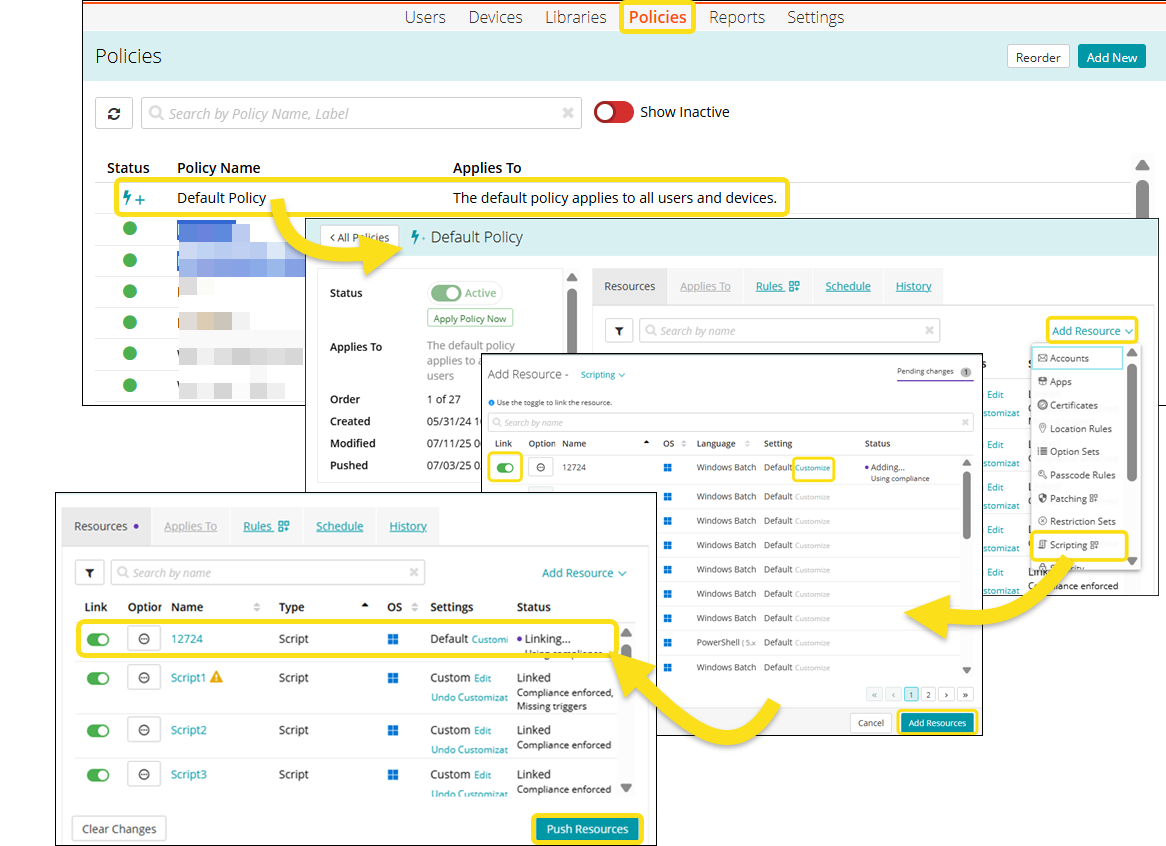
To link a script to a policy,
- Go to Policies in top navigation to open the Policies page.
- Click an individual policy to open it.
- Click Add Resource and then click Scripting to open the Add Resources dialog with published scripts library.

NOTE: Only published scripts are available for linking to the policy. Draft scripts are excluded from the Add Resource dialog and cannot be linked.
- Link the selected script to the policy by sliding the Link toggle for the script to the right. The color of the toggle changes to green indicating the script is linked.
- (Optional) Before pushing the script to the policy click Customize to open the Review and Customize Settings dialog.
You can add and modify the User account, Timeout, Environment variables, and Triggers and save the changes.
NOTE: Any customization (environment variables, triggers, etc.) made is applicable only to the linked policy. The script in the Scripting Library remains unaffected. See the Customize a Script in Policy topic for more information.

NOTE: If you miss adding triggers to a script, the script is deployed to the device but not executed. The script status shows Missing triggers. It runs only when you add Triggers to it. See the Adding Triggers to a Script topic for more information.
- Click Push Resources to deploy the script on the devices.
When a script with a trigger is published and linked to a policy, the system deploys it to the target device. The script is stored locally on the device but does not execute until the trigger condition is met.
Verify Script Deployment
You can verify the script deployment on a device.
To verify the script deployment,
- Go to the Device List.
- Under Scripting > Scripts, confirm the newly linked script is listed.
- Under Scripting > History, view job runs associated with the newly linked script.
Deployment and Execution Scheduling of a script
To ensure scripts run as intended, it is important to understand how scheduling works at both the policy and script levels.
- Any schedule defined in the containing policy will determine when the linked script is deployed to associated devices.
- Any schedule defined in a trigger within the script itself will determine when the script is executed on those devices.